Tools for paper, digital.

Washi is a small family of paper-simple apps — one for getting things done, one for thinking out loud.
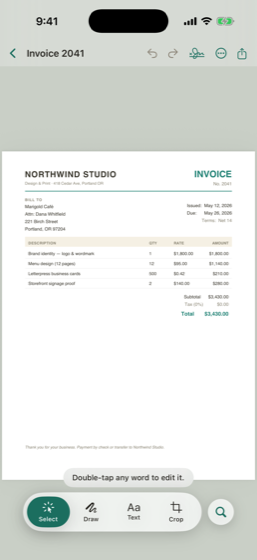
washi·doc editing the text of a PDF on iPhone
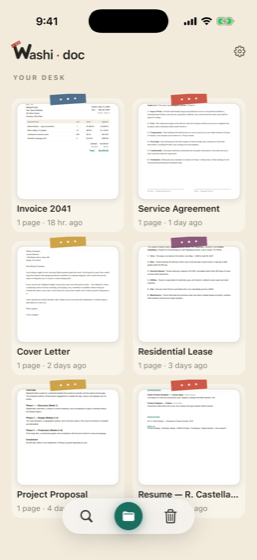
washi·doc's desk of recent documents on iPhone

washi·doc also runs in your browser — nothing to install, and the editing still happens on your own machine. The browser app is part of the subscription. Your washi·pad wall opens in your browser too, with Washipad Cloud.


The utility side

washi·doc

Your Paper Desk

Fix this PDF in 30 seconds.

A fast, native document editor. Edit the real text — not just sticky annotations — sign, redact, and ship.

Free

Download it and fix your PDFs. No account, no ads, no trial clock — on Mac, iPhone, iPad and Android.

Edit the real textChange what’s on the page, not a note over it.
Sign & fill formsDraw, type or drop in a photo signature.
RedactPersonal info truly removed, not covered up.
OCRMake a scan searchable and selectable.
Camera scanPaper to clean PDF in one pass.
Page toolsRotate, delete, reorder, export, share.
iPhone & iPad App Store 100% Free
Android Google Play 100% Free
Mac Mac App Store 100% Free
Browser app.washidoc.com Subscription
Washidoc editing an invoice
Washidoc document desk
The creative side

washi·pad

Your Paper Wall

Just paper.

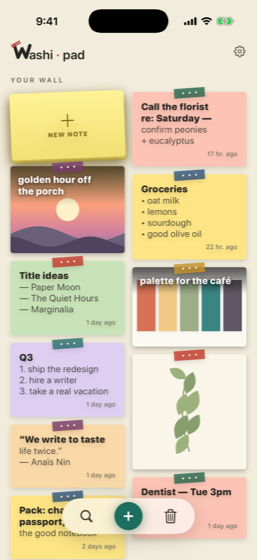
A simple sticky-note wall. Jot a thought, peel a fresh sheet, arrange it on the wall.

  • ✓Peel & jot — tap to pull a fresh sheet, type, pick a washi-pastel color.
  • ✓A living wall — notes flow into balanced columns, hand-tilted with a strip of tape.
  • ✓Photos between paragraphs — drop an image right into a note.
  • ✓Yours, on your device — notes live on your phone and sync free through your own iCloud. No account needed.
  • ✓On any computer — with Washipad Cloud, your wall opens at app.washipad.com and syncs with Android too.

Free. Everything on your phone, iCloud sync included. Washipad Cloud — your wall on any computer and on Android — is $0.49/month or $4.99/year.

Washipad sticky-note wall
Why this exists

I bought a “lifetime” license once.

It was a different PDF app, and honestly a good one. Then they shipped an update, decided a few of the features I already used belonged in a new tier, and my lifetime came out to about eighteen months. Nobody stole anything from me. It just wasn’t the deal I paid for anymore.

So the everyday stuff in washi·doc is free. Editing, signing, redacting, OCR, page tools. It stays free. What you pay for is the once-a-quarter chores, not the thing you’re doing at 11pm the night before something is due. If I ever move a free feature behind the paywall, you have my blessing to be loud about it.

— Hayden · built mostly at night

Questions

Does Washidoc upload my PDFs to a remote server?

No. Washidoc processes and edits your documents entirely on your local device. Your sensitive files and personal data never leave your computer or phone.

Is Washidoc free?

Yes. All on-device editing, scanning, signing, redacting, watermarks, Bates numbering, and unlimited document management on Mac, iOS, and Android are 100% free with zero ads and zero tracking. Washidoc Cloud is an optional subscription for cross-device backup, Convert to Word & Excel, and web access.

What platforms are supported by Washidoc?

Washidoc is available natively for Mac, iPhone, iPad, Android, and as a browser-based web application at app.washidoc.com.